Storefront
Turn each branch's listed inventory and published content into a branded website buyers can browse and contact.
Your DealerSpot storefront gives each branch a website for shoppers. The same vehicles your team manages in Inventory become the listings buyers browse.
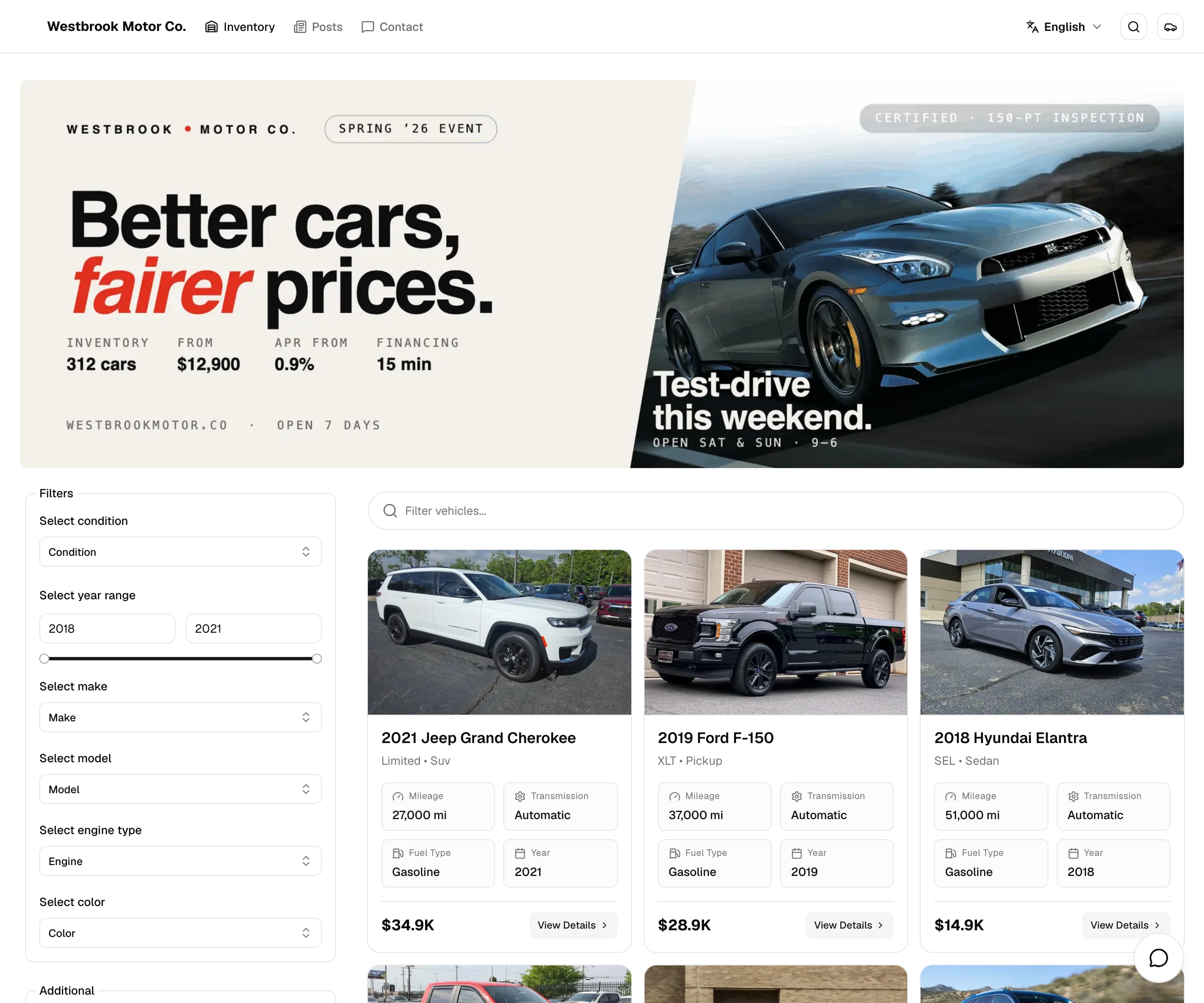
Show shoppers what is available
A storefront helps you move from an internal vehicle record to a complete buyer journey:
- Present current inventory with photos, asking prices, specifications, and public custom fields
- Give shoppers focused search and filters instead of a static vehicle list
- Publish dealership news, stories, reviews, and legal pages from Posts
- Capture contact details and vehicle interests in the branch that received the inquiry
Your team controls what buyers see by updating the branch, vehicle, and post in DealerSpot.
Update the website from DealerSpot
You do not need to enter a vehicle again in a separate website. Update the vehicle once in DealerSpot, then list it when it is ready.
This keeps common website work simple:
- Branch assignment determines which location presents the vehicle or post.
- Vehicle status controls whether the vehicle stays with your team or appears for shoppers.
- Posts and legal pages stay with the rest of your dealership content.
- Storefront inquiries return to DealerSpot so your team can follow up.
One website per branch
Each branch can have its own DealerSpot website address. The website shows content for that branch:
- The homepage shows inventory for that branch.
- Only vehicles with Listed status appear publicly.
- Only Published posts assigned to that branch appear publicly.
- Branding, contact information, subdomain, and custom domain settings belong to that branch.
Check the branch before publishing
A Listed vehicle or Published post must belong to the same branch as the website where you want it to appear.
What shoppers can browse
The storefront navigation includes Inventory, Posts, and Contact. It can also include up to three published posts that have a navigation title enabled.
Inventory homepage
Shoppers can search the listed inventory and filter by:
- Condition
- Year
- Make and model
- Engine
- Color
- Public custom-field values
The storefront does not currently provide a buyer-facing sort control.
Keep private information out of filter choices
Do not use the same custom-field choice for both public vehicle details and private team information. A shopper's filter choice may match that value even when it is hidden on a vehicle. See Vehicle Custom Fields for help.
Vehicle Details
Each public vehicle page can show:
- Image gallery
- Asking price and price details
- Vehicle title, description, and specifications
- Custom-field values marked public on that vehicle
Posts and Legal pages
Blog, News, Review, and Story posts appear in Posts. Published Legal posts appear in the website footer.
How buyer inquiries reach DealerSpot
When a shopper submits the contact form, DealerSpot:
- Creates a contact for the branch, or updates the contact already connected to that shopper's visit.
- Replaces the contact's interests with the submitted vehicles that are still valid and listed.
- May create a one-hour test-drive event when the visitor requests a test drive.
The form requires first name, last name, phone number, and accepted terms. A matching name or phone number does not always prevent a new contact, so check for duplicates. The submission does not currently appear in Contact Activity. Test-drive choices begin tomorrow and use 15-minute times.
The contact button offers phone, text, and test-drive actions. It is not live chat.
Launch a storefront
- Open Settings, select Branches, and choose the branch.
- Complete its basic details, address, contact information, branding, theme, and subdomain.
- Add photos and listing content to a vehicle, assign it to the branch, and change its status to Listed.
- Open the branch storefront from DealerSpot and verify the public vehicle information.
- Publish posts when you want additional content in Posts or the storefront navigation.
In this section
Customize Your Storefront
Set branch branding, public contact details, and the Light, Dark, or System theme.
Connect a Custom Domain
Follow the exact domain instructions DealerSpot provides for the branch.
Storefront SEO
Help search engines understand your branch, vehicles, and posts.
Posts
Create and publish branch content for Posts, Legal pages, and navigation.